

Custom Quests Using Data Ingestion APIs
This page explains how to configure in-game custom quests using Data Ingestion APIs by sending gameplay data to Forge.
Introduction
Forge has two APIs that allows one to run quests on our platform that reward players for their in-game activity:
- One API for recording a player's game time
- Another one is for recording a player's achievements in the game
Once integrated and quest configured, forge will detect completed quests automatically.
Understanding the APIs
API Documentation
Detailed request and response specifications for the Data Ingestion APIs are available in the API Reference section.
Please refer to the following pages:
Getting the API Key
Both Forge APIs require an API Key for authentication.
How to Get an API Key
To get your API key, refer to the steps documented in Obtain API Key guide.
You will receive a unique API key per game when integrating with Forge.
The API key is a base64-encoded string generated from the following format:
<partner-name>:<game-name>:<game-id>:<random-secret>
Example
| Field | Value |
|---|---|
| partner-name | game1 |
| game-name | game1 |
| game-id | game1-01 |
| random-secret | cHq12EXeuZvP |
Base64-encoded API key:
cGl4ZWw6cGl4ZWw6cGl4ZWwtMDE6Y0hxMTJFWGV1WnZQ
Rate Limits
Each API key has a daily request limit of 500,000 requests. This is a soft safety limit and can be increased if higher usage is required.
Player Achievements Ingestion API
What it does
The Player Achievements Ingestion API allows you to send information about in-game achievements unlocked by a player to Forge.
This data is used by Forge to track progress and complete quests that are based on achievement unlocks.
When to use it
Use this API when a custom quest depends on in-game achievements, such as:
- Unlocking a specific achievement
- Unlocking a certain number of achievements
This API should be used only for in-game achievement events.
How Forge uses the data
When achievement data is sent to Forge:
- Forge identifies the game details using the API key
- Forge maps the achievement data to the correct user using the provided user identifier
- Forge updates quest progress based on the received achievements
- Quest completion is evaluated automatically as new achievement data is ingested
Important usage notes
- Each request must include at least one supported user identifier:
- Email ID, or
- Blockchain + wallet address, or
- Platform user ID + platform name
- The API supports both single-record and batch ingestion
- Achievement data must follow the request structure defined in the API Reference
- Quest progress updates only after achievement data is successfully ingested
Player Playtime Data Ingestion API
What it does
The Player Playtime Data Ingestion API allows you to send in-game playtime data to Forge.
This data is used by Forge to track and evaluate quests that depend on game playtime.
When to use it
Use this API when a custom quest depends on playtime, such as:
- Play a game
- Play a game daily
- Play the game for N total hours
- Play the game for N hours per day
This API should be used only for in-game playtime tracking.
How Forge uses the data
When playtime data is sent:
- Forge identifies game details using the API key
- Forge maps the playtime to the correct user using the provided identifier
- Forge aggregates playtime across sessions for that user
- Quest progress is updated based on the accumulated playtime data
As new playtime data is ingested, Forge evaluates whether playtime-based quest conditions have been met.
Important usage notes
- Each record must include at least one supported user identifier:
- Email ID
- Blockchain + wallet address
- Platform user ID + platform name
- The API supports batch inserts (multiple playtime records in a single request ) to reduce the number of calls.
- Playtime should represent distinct gameplay sessions and follow the structure defined in the API Reference.
Custom Quest Configuration
The following section will cover some most common scenarios to showcase how to configure custom quests related to in-game data on Forge.
All the examples below assume your name is ABC GAME STUDIO and your game name is ABC and your API Key is XYZABCXYZ
Example: A Quest for Daily Login
This example shows how to set up a Daily Login Quest on Forge.
The quest rewards users for logging into your game daily. The quest refreshes every 24 hours based on the configured start time (e.g., if the quest starts at 12:00 AM UTC, it will refresh daily at 12:00 AM UTC).
First, set up a script to send login data to Forge
For this example, we use the Player Achievements Ingestion API to send a daily login event as an achievement.
The achievement name used in this example is DAILY_LOGIN.
This is only an example, you are free to use any achievement name that fits your use case, as long as the same name is used consistently in API calls and quest configuration.
For user identification on Forge, we use the user’s email.
Each login event is sent to Forge as an achievement unlock.
Approach 1: Send Daily Login Event (Single User)
Use this approach when you want to send login data immediately after a user logs in.
import requests
from datetime import datetime

API_URL = "https://partners-api.forge.gg/player/achievement"
API_KEY = "<YOUR_API_KEY>"

payload = {
    "achievement_title": "DAILY_LOGIN",
    "achievement_description": "User logged in for the day",
    "unlock_time": datetime.utcnow().strftime("%Y-%m-%d %H:%M:%S"),
    "unlocked": True,
    "user_email": "[email protected]"
}

headers = {
    "X-API-Key": API_KEY,
    "Content-Type": "application/json"
}

response = requests.post(API_URL, json=payload, headers=headers)
print(response.status_code, response.json())
Approach 2: Send Daily Login Events in Batch (Multiple Users)
Use this approach if you prefer to send login data periodically, for example as a scheduled job that runs every few hours.
Multiple login events can be sent in a single batch request. This batch method helps reduce the number of API calls when processing large volumes of login events.
import requests
from datetime import datetime

API_URL = "https://partners-api.forge.gg/player/achievement"
API_KEY = "<YOUR_API_KEY>"

payload = [
    {
        "achievement_title": "DAILY_LOGIN",
        "achievement_description": "User logged in for the day",
        "unlock_time": "2025-01-01 08:30:00",
        "unlocked": True,
        "user_email": "[email protected]"
    },
    {
        "achievement_title": "DAILY_LOGIN",
        "achievement_description": "User logged in for the day",
        "unlock_time": "2025-01-01 09:10:00",
        "unlocked": True,
        "user_email": "[email protected]"
    }
]

headers = {
    "X-API-Key": API_KEY,
    "Content-Type": "application/json"
}

response = requests.post(API_URL, json=payload, headers=headers)
print(response.status_code, response.json())
Second, configure the quest on Forge Dashboard
Log in to the Forge dashboard at https://dash.forge.gg.
- From the left navigation, select Quests
- Click Quest in the top-right corner
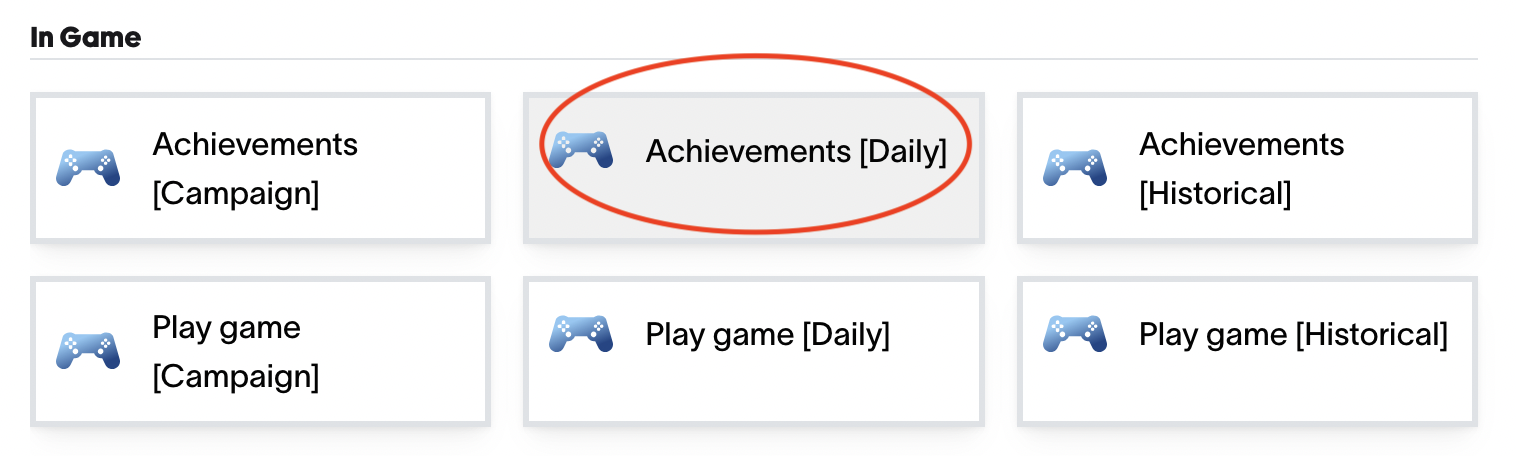
- Select Achievements [Daily] as the quest type
Quest Configuration Fields
Fill in the quest details as follows:
-
Title
The title shown to users. It should clearly describe the quest.
Example:LOG INTO GAME ABC -
Description
A short explanation of what the user needs to do.
Example:Log into our game daily to complete the quest and earn points -
Achievement Title
This must exactly match the achievement name sent via the Data Ingestion API
(including case and spacing).
Example:DAILY_LOGIN -
Game Platform
This field is pre-filled. Leave it unchanged. -
Points
Set the number of points to reward the user upon quest completion. -
Tags (Optional)
Tags help categorize quests.
Example:game,daily -
Start Time
Set the date and time when the quest should become active.
This can be set to any future time.
Save and Publish
- Click Save and ensure the quest is marked as Enabled
- Click Publish in the top-right corner
Once published, the quest becomes live and users can now start completing the quest.
Example: A Quest for Achieving Level 5 in Your Game
This example shows how to set up a one-time quest on Forge that rewards users for reaching Level 5 in your game.
Unlike daily login quests, this quest is not recurring. Once the user reaches Level 5 and completes the quest, it will not reset.
First, set up a script to send level completion data to Forge
For this example, we use the Player Achievements Ingestion API to send a one-time achievement event when a user reaches Level 5 in the game.
The achievement name used in this example is GAME_LEVEL_5_REACHED.
This is only an example — you may use any achievement name that fits your use case, as long as the same name is used consistently in API calls and quest configuration.
For user identification on Forge, we use the user’s email.
When a user reaches Level 5, your system should send a single achievement event to Forge.
Approach 1: Send Level Completion Event (Single User)
Use this approach when you want to send the achievement event immediately after the user reaches Level 5.
import requests
from datetime import datetime

API_URL = "https://partners-api.forge.gg/player/achievement"
API_KEY = "<YOUR_API_KEY>"

payload = {
    "achievement_title": "GAME_LEVEL_5_REACHED",
    "achievement_description": "User reached level 5 in the game",
    "unlock_time": datetime.utcnow().strftime("%Y-%m-%d %H:%M:%S"),
    "unlocked": True,
    "user_email": "[email protected]"
}

headers = {
    "X-API-Key": API_KEY,
    "Content-Type": "application/json"
}

response = requests.post(API_URL, json=payload, headers=headers)
print(response.status_code, response.json())
Approach 2: Send Level Completion Events in Batch (Multiple Users)
Use this approach if you prefer to send level completion data periodically, such as through a scheduled batch job.
This is useful when:
- You want to reduce the number of API calls
- Multiple users may complete the level within a short time window
Multiple level completion events can be sent in a single batch request.
import requests

API_URL = "https://partners-api.forge.gg/player/achievement"
API_KEY = "<YOUR_API_KEY>"

payload = [
    {
        "achievement_title": "GAME_LEVEL_5_REACHED",
        "achievement_description": "User reached level 5 in the game",
        "unlock_time": "2025-01-02 14:20:00",
        "unlocked": True,
        "user_email": "[email protected]"
    },
    {
        "achievement_title": "GAME_LEVEL_5_REACHED",
        "achievement_description": "User reached level 5 in the game",
        "unlock_time": "2025-01-02 15:05:00",
        "unlocked": True,
        "user_email": "[email protected]"
    }
]

headers = {
    "X-API-Key": API_KEY,
    "Content-Type": "application/json"
}

response = requests.post(API_URL, json=payload, headers=headers)
print(response.status_code, response.json())
Second, configure the quest on Forge Dashboard
Log in to the Forge dashboard at https://dash.forge.gg.
- From the left navigation, select Quests
- Click Quest in the top-right corner
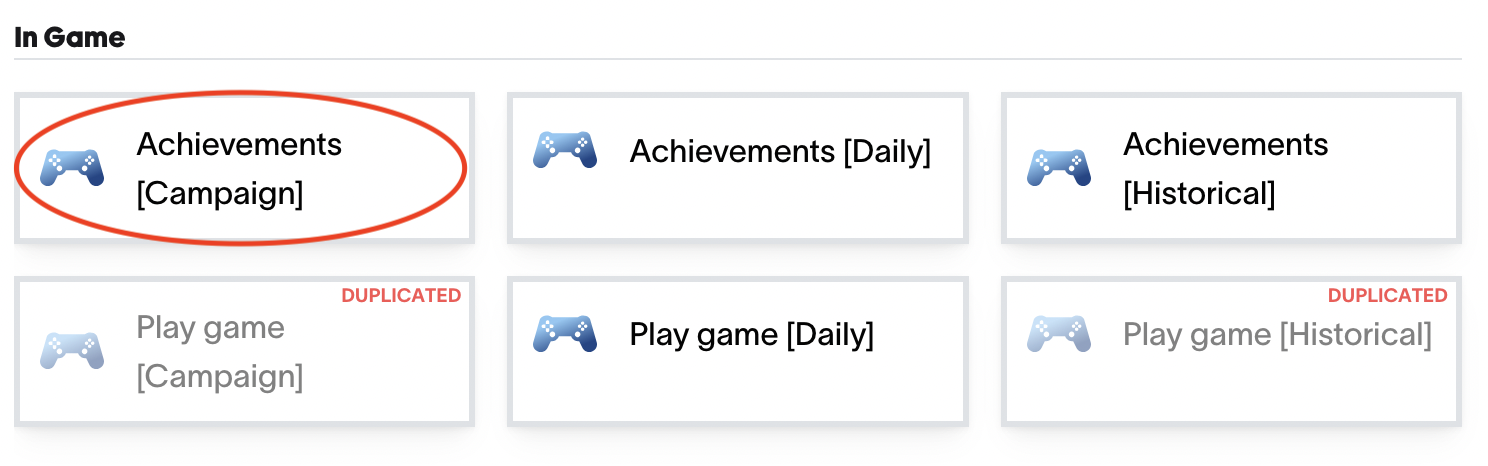
- Select Achievements [Campaign] as the quest type
Quest Configuration Fields
Fill in the quest details as follows:
-
Title
The title shown to users. It should clearly describe the goal of the quest.
Example:REACH LEVEL 5 OF ABC GAME -
Description
A short explanation of what the user needs to do to complete the quest.
Example:Reach level 5 in the game to complete this quest -
Achievement Title
This must exactly match the achievement name sent via the Player Achievements Ingestion API
(including case and spacing).
Example:GAME_LEVEL_5_REACHED -
Game Platform
This field is pre-filled. Leave it unchanged. -
Points
Set the number of points to reward the user for completing the quest. -
Tags (Optional)
Tags help categorize the quest.
Example:game -
Start Time
Set the date and time when the quest should become active.
Save and Publish
- Click Save and ensure the quest is marked as Enabled
- Click Publish in the top-right corner
Once published, the quest becomes live.
When a user reaches Level 5 and the achievement event is sent to Forge, the quest will be completed automatically.
Example: A quest for playing your game for 1 hour daily
(To be added.)
Updated 9 months ago